
AI Automation for Small Business: Your First Workflow in 30 Days (With Real ROI Math)
Affiliate Disclosure: This page contains affiliate links. If you purchase through our links, we may earn a commission at no extra cost to you. This helps us keep creating free content. Learn more
AI Automation for Small Business: Your First Workflow in 30 Days (With Real ROI Math)
AI automation for small business works when you automate one workflow end to end — not when you buy ten tools and automate nothing. Pick a repetitive process that follows the same steps every time (invoice processing, lead follow-up, support triage), map it, automate it with a modest tool stack, and measure hours saved against cost. For a typical five-to-twenty-person business, three automatable workflows worth about 65 hours a month of manual work can be automated conservatively for a net gain of roughly $650 a month, with payback in five to six weeks.
That answer is deliberately concrete, because most pages ranking for this topic are tool listicles. Lists of "12 best AI tools" don't tell you what to automate first, how to wire it up, or whether the money works. This guide does the opposite: it walks through the three workflows worth automating first, the actual implementation of each, the ROI math with real numbers, a 30-day rollout plan, and the data-privacy questions you should ask before connecting anything.
Key Takeaways
- Automate workflows, not tasks. A workflow has a trigger, a repeatable process, and a measurable output — that's what makes it automatable and measurable.
- The first three workflows for most small businesses: invoice processing, lead follow-up, and support triage. Together they typically consume 60–70 hours a month of manual work.
- Conservative ROI: recover 50% of 65 hours/month at a $25/hour loaded labor rate, subtract $100–$300/month in tools, and payback lands around five to six weeks.
- A 30-day rollout beats a big-bang project: one workflow, mapped in week one, piloted in weeks two and three, tuned and measured in week four.
- Data-privacy fears are manageable: route sensitive data through tools with clear data-processing terms, keep humans in the loop on anything customer-facing, and never paste confidential data into consumer chatbots.
What AI Automation Actually Means for a Small Business
Automation is not a chatbot bolted onto your homepage. A workflow is a sequence with three parts: a trigger (an invoice arrives, a form is submitted, an email lands in support@), a process (classification, data entry, drafting, routing), and an output (a posted payment, a scheduled call, a ticket assigned to the right person). AI automation means putting a model or rules engine inside that process so a human handles only the exceptions.
The distinction matters because it tells you what is automatable. If a process has the same shape every time and the cost of an occasional error is low or catchable, it's a candidate. If every instance is genuinely different and an error is expensive — say, negotiating a contract — keep it human. The tool listicles obscure this, which is why businesses buy software and still do everything by hand: the tool was never attached to a defined workflow.
You also don't need to build anything custom to start. The modern stack for a first workflow is usually three pieces: a connection layer (Zapier, Make, or native integrations), an AI step (an email-drafting or document-extraction capability inside software you already pay for, or an API call through the connection layer), and a human checkpoint. Taskade's guide to AI automation for small business catalogues 15 workflow patterns worth scanning for ideas, but implementation is what separates the businesses that save hours from the ones that just add another subscription.
The Three Workflows Worth Automating First
Not all workflows pay back equally. These three show up in nearly every small business, consume measurable hours every week, and fail gracefully — a wrong output is easy for a human to catch before it costs anything.
1. Invoice Processing (Accounts Payable and Receivable)
Manual shape: an invoice arrives by email, someone retypes the vendor, amount, and dates into accounting software, files the PDF, and chases approvals. For a business processing 30–60 invoices a month, this is typically 4 hours a week (about 17 hours a month).
Automated shape: inbound email triggers extraction of vendor name, amount, due date, and line items from the PDF; the data lands in a draft bill in your accounting tool with the PDF attached; anything below a confidence threshold or above a dollar limit goes to a human approval queue; approved bills get scheduled for payment.
Implementation notes: QuickBooks, Xero, and most modern accounting platforms now include AI document capture — start there before adding anything new. Route all invoices to a dedicated email address so the trigger is clean. Set a dollar threshold (commonly $500–$2,000) above which every bill needs human approval regardless of confidence. Expect 80–90% straight-through processing within a month; the remaining exceptions are exactly the ones worth a human's attention.
2. Lead Follow-Up
Manual shape: a form submission arrives, someone notices it minutes — or days — later, sends a templated reply, books a call, forgets to follow up with the half who never respond. This is typically 5 hours a week (about 22 hours a month) and, more expensively, a leaky funnel: speed-to-lead is one of the strongest predictors of conversion.
Automated shape: form submission triggers an instant acknowledgment, a drafted personalized first reply (not a generic template — the model references what the lead actually asked), a calendar link, and a structured follow-up sequence: no booking after 48 hours means a second touch; no response after a week means a third; after 14 days the lead is marked nurture and moved to the newsletter list. Every touch is visible in the CRM.
Implementation notes: build the sequence in your CRM's native automation or a connection layer. Keep AI responsible for drafting and personalizing, rules responsible for timing — that division is what keeps it from going off-script. Always show the human a preview of outbound drafts for the first two weeks. GoDaddy's walkthrough of 15 AI workflow examples for small businesses includes several lead-handling variants worth borrowing.
3. Support Triage
Manual shape: every email to support@ is read by whoever is least busy, forwarded or re-sent to the right person, and answered from scratch even when the answer is one the business has written twenty times. Typical cost: 6 hours a week (about 26 hours a month).
Automated shape: inbound email is classified (billing, technical, sales, spam), routed to the right queue, and — only for the handful of question types you've explicitly approved — answered with a drafted reply grounded in your actual help docs, with a human reviewing before send. Everything else arrives pre-labeled with a suggested response draft and relevant links.
Implementation notes: start with classification and routing only — that alone kills most of the triage cost and cannot embarrass you. Add drafted replies for your top five repetitive questions, each grounded in a specific help-doc URL, human-approved before send. Lindy's testing writeup of AI agents for small businesses is a useful reference for what triage agents can and cannot reliably do in practice.
The ROI Math, With Real Numbers
Here's the calculation for a representative business — five to twenty people, doing all three workflows manually:
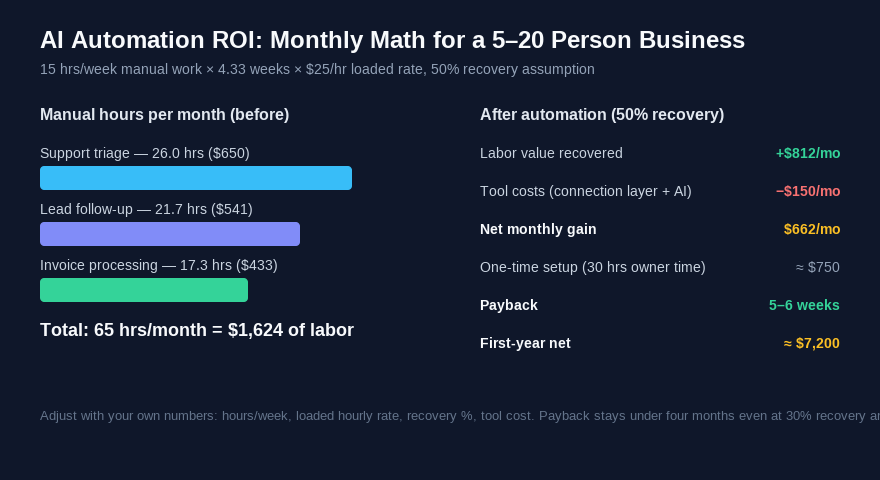
| Workflow | Manual hours/week | Hours/month | Labor value at $25/hr | |---|---|---|---| | Invoice processing | 4 | 17.3 | $433 | | Lead follow-up | 5 | 21.7 | $541 | | Support triage | 6 | 26.0 | $650 | | Total | 15 | 65.0 | $1,624 |
Assumptions, stated plainly so you can adjust them: a loaded labor rate of $25/hour (wage plus taxes and overhead for admin-level staff — use your own), and 4.33 weeks per month.
Now the conservative side of the ledger. Assume automation recovers only 50% of those hours — the other half goes to exceptions, review, and the human checkpoints you should keep. That's 32.5 hours a month, worth $812. Tool costs for this stack typically run $100–$300 a month (most businesses already own the CRM and accounting software; the connection layer and AI features add the rest). At $150 a month:
- Net monthly gain: $812 − $150 = $662
- One-time setup: 20–40 hours of your time, worth roughly $500–$1,000 at the same rate
- Payback: five to six weeks
- First-year net: about $7,200
Run the aggressive case and the numbers triple; run the pessimistic case — 30% recovery, $300 in tools — and payback still lands under four months. The sensitivity that actually matters is hours, not tool price: if a workflow only consumes 1 hour a week, no tool pricing makes it worth automating first. That's why the three above, which together consume 15 hours a week, are the standard starting set. Upmetrics' breakdown of AI tools for small businesses includes free tiers that push the tool-cost line even lower while you validate.
The 30-Day Rollout Plan
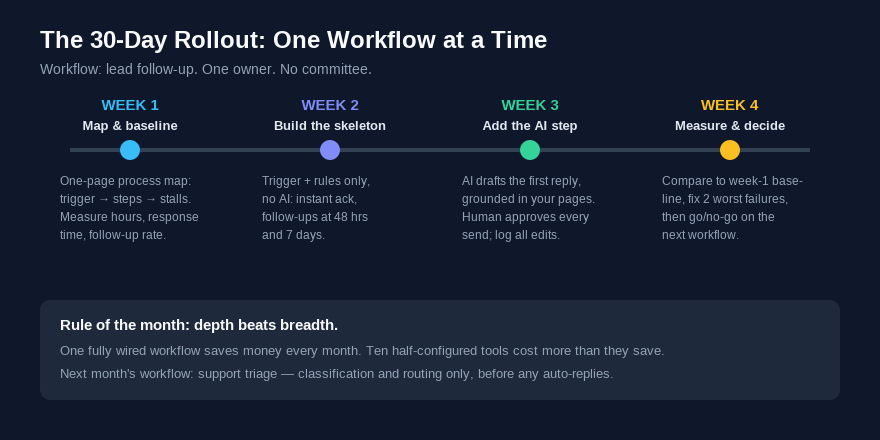
One workflow at a time, in this order. Thirty days, one owner (probably you), no committee.
Week 1 — Map and baseline. Pick lead follow-up (fastest visible win). Write the current process on one page: trigger, every step, every handoff, every place it stalls. Measure the baseline — hours spent last week, average response time to new leads, follow-up completion rate. You cannot prove ROI without this.
Week 2 — Build the skeleton. Wire the trigger (form → CRM) and the rules (acknowledgment in 5 minutes, follow-ups at 48 hours and 7 days). No AI yet. Half the value of automation is that follow-ups simply never get forgotten, and that requires no model at all.
Week 3 — Add the AI step. Turn on AI drafting for the first reply, grounded in your service page and pricing. Every outbound draft requires human approval. Log every edit the human makes — that edit log is your tuning data and your quality report.
Week 4 — Tune, measure, decide. Compare against the week-1 baseline: response time, hours spent, follow-up completion. Fix the two worst failure cases. Then make the go/no-go call: if hours saved exceed the projection, move to workflow two (support triage classification) next month; if not, fix the workflow before blaming the tool.
The Data-Privacy Questions to Ask First
The objection almost no ranking page addresses seriously: "Am I handing my customer data to someone else's computer?" It's a fair question, and the answer is manageable if you ask it before connecting, not after.
Where does my data go, and is it used for training? This is the single most important question. Reputable business tools (your CRM, your accounting platform, established automation platforms) offer data-processing agreements and — for their AI features — contractual commitments that your inputs are not used to train models. Consumer chatbots generally offer no such commitment. The practical rule: customer and business data flows only through tools with a business agreement that says it isn't retained or trained on; free consumer tools get none of it.
What's the blast radius if it errs? Rank every automated step by what a wrong output costs. A mislabeled support ticket costs seconds. A wrong invoice amount costs a payment. An unapproved outbound email to a customer costs trust. Design accordingly: human checkpoints before anything leaves the building — payments scheduled, emails sent, quotes issued — and full automation only for internal steps like classification and data entry.
What does the log show? Every workflow in this guide produces an audit trail: what came in, what the AI decided, what a human changed. Review the human-edit log weekly for the first month. Rising edit rates mean drift — a new invoice format, a new question type — and tell you exactly where to tune.
NIST's AI Risk Management Framework is the heavyweight reference here; a small business needs maybe 2% of it, but its core instinct is right: know your data, keep humans accountable for outputs, and monitor after deployment rather than trusting a demo.
Three Failure Modes That Sink Small-Business Automation
- Automating a process that shouldn't exist. If your lead follow-up is chaos because five people use five versions of the truth, automation just produces chaos faster. Clean the process first — it takes a day and doubles the automation's value.
- No baseline, so no proof. Without week-1 numbers, the automation "feels" fine and the hours quietly leak back. One hour of measurement protects the whole project.
- Tool sprawl instead of workflow depth. Ten half-configured tools cost more than they save. One fully wired workflow saves money every month. Depth first, breadth later — the practical guide to AI automation for small businesses from Autonomous reaches the same conclusion from the operations side.
Start This Week
Pick lead follow-up, write the one-page map, and measure last week's baseline — that's a two-hour job and it starts the clock on a five-to-six-week payback. If you'd rather have an outside pair of hands, SparkSphear builds exactly this kind of operational automation alongside the technical foundation it runs on: see our services overview, our web design and build work for the front-end your forms and CRM sit on, or our IT audit service to check that your data and systems are ready before you connect anything. Our pricing page shows what engagements cost, and our industry growth guides cover the marketing workflows that feed the leads this automation should catch.
Want these results for your AI & Automation?
We build custom AI agents and workflow automations tailored to your exact operations. Stop losing money to manual work.