
CRM for Small Business in 2026: A Service-Business Buyer's Guide
Affiliate Disclosure: This page contains affiliate links. If you purchase through our links, we may earn a commission at no extra cost to you. This helps us keep creating free content. Learn more
CRM for Small Business in 2026: A Service-Business Buyer's Guide
The best CRM for a small business in 2026 is Bigin by Zoho if you want the cheapest usable pipeline (from $7/user/month), Freshsales if you want built-in phone and email at $9/user/month, Pipedrive if your team lives in a visual sales pipeline ($14/seat/month), and HubSpot if you want to start free and grow into an all-in-one marketing and sales platform — with one hard warning attached: HubSpot's Sales Hub Professional tier costs $90/seat plus a mandatory $1,500 onboarding fee, and most teams under 10 seats never need to go there.
Here's the problem with most of what you'll read on this topic. Roundups from enterprise analysts and vendor blogs default to Salesforce-shaped advice: implementation cycles, admin headcount, enterprise seat tiers. If you run a service business — an agency, a law office, a home-services company, a consulting shop — you have none of that. You have a spreadsheet with a few hundred contacts, two to eight people who touch customers, and a pipeline that leaks because follow-ups live in someone's memory. This guide is built for that business: real per-seat pricing for teams under 10, a migration plan that gets your spreadsheet data across intact, and an honest assessment of which AI features earn their keep at small scale.
Key Takeaways
- For teams under 10 seats, paid entry pricing clusters between $7 and $20 per user per month: Bigin from $7, Freshsales Growth at $9, Pipedrive Lite at $14, HubSpot Starter around $15–$20.
- HubSpot's free plan covers 2 users and 1,000 contacts — genuinely usable, but a third person who edits records needs a paid seat.
- Sales Hub Professional costs $90/seat billed annually plus a required $1,500 onboarding fee — roughly $6,900 in year one for a 5-seat team. It's the most common way small teams overspend.
- Spreadsheets fail predictably: analysis of multiple studies puts spreadsheet error rates near 88%, and businesses past roughly 50–100 new leads per month hit the spreadsheet wall.
- Most AI features worth paying for at small scale are the cheap ones: email drafting, call transcriptions, and next-step suggestions. Predictive lead scoring is usually gated behind tiers a team under 10 seats doesn't need.
Price-Per-Seat Reality for Teams Under 10
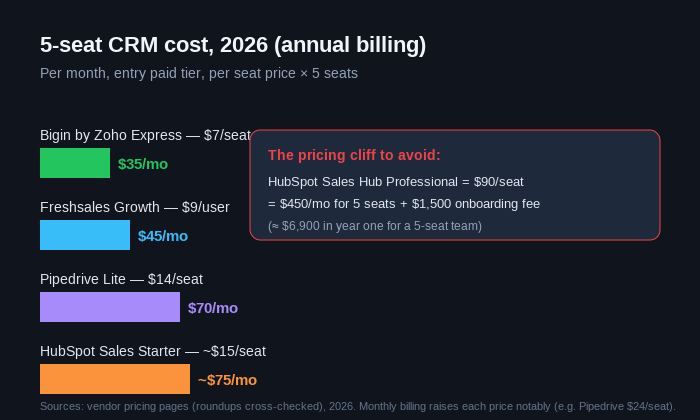
Sticker prices in this category are honest — the traps are in what sits next to them. Here is what the major small-business CRMs actually cost per seat in 2026, annual billing:
| CRM | Entry paid tier | Per seat / month (annual) | Per seat / month (monthly billing) | |---|---|---|---| | Bigin by Zoho | Express | from $7 | ~$10 | | Freshsales | Growth | $9 | ~$11 | | Pipedrive | Lite | $14 | $24 | | HubSpot Sales Hub | Starter | ~$15 | $20 | | HubSpot Sales Hub | Professional | $90 | $100 + $1,500 onboarding fee |
Two pricing facts decide most small-business outcomes:
- Annual-vs-monthly billing can double the price. Pipedrive's Lite plan is $14/seat/month billed annually and $24 billed monthly — a 71% premium for flexibility. Pipedrive advertises up to 42% savings on annual plans, and that requires paying the year upfront. If cash flow is tight, the monthly price is your real price, not the annual one on the comparison chart.
- The onboarding fee, not the seat price, is the cliff. HubSpot's Starter tier has no onboarding fee, so a 5-seat team pays about $75–$100/month. Moving to Sales Hub Professional at $90/seat annual adds a mandatory one-time $1,500 fee — $6,900 in year one for 5 seats, $12,300 for 10. Professional buys marketing-grade automation and reporting depth that a service business with a single pipeline rarely uses. Stay on Starter until you can name the specific Professional-only feature you're missing.
A simple rule for teams under 10 seats: budget $10–$25 per seat per month all-in, and be suspicious of any path that lands you above $50 per seat before you've outgrown your first pipeline.
Best CRM Picks by Business Type (Service Businesses First)
The right pick depends on how your business earns, not on feature-count standings. PCMag's 2026 tested roundup of small business CRM software (PCMag) and TechRadar's 2026 comparison (TechRadar) both land on the same shortlist — here's how to choose inside it:
Consultants, agencies, and professional services: Pipedrive
If your entire business is a pipeline — lead, proposal sent, negotiation, won — Pipedrive is the purest fit. The visual pipeline forces every deal to have a next action, which is exactly the discipline a spreadsheet lacks. Its sales-focused design skips marketing modules you'd never open, and the Lite plan at $14/seat covers pipeline management, email sync, and a mobile app. Teams that also run projects inside the CRM may want its Growth or Premium tiers, but most 5-person shops stay on Lite.
Budget-constrained teams and first-CRM adopters: Bigin by Zoho
Bigin is Zoho's small-business-specific product, and its Express tier from $7/user/month is the cheapest fully functional pipeline CRM in the category. It handles one or two pipelines, basic automation, and mobile use without feeling like a toy. The tradeoff is ceiling: complex multi-pipeline operations outgrow it, but that's a good problem you won't have in year one.
Businesses that live on the phone and inbox: Freshsales
Freshsales Growth at $9/user/month includes built-in phone, email, and chat — no stitching together a separate dialer or helpdesk. For home-services businesses, clinics, and anyone whose deals close across a dozen phone calls, having calls logged against the contact record automatically is worth more than any dashboard. Freddy AI's lead scoring and deal insights are reachable at the affordable Pro tier rather than buried at enterprise pricing.
Teams that want marketing and sales in one place: HubSpot
HubSpot's free CRM is genuinely functional — 2 users, 1,000 contacts, deal pipelines, meeting scheduler, live chat — not a trial. Start there, upgrade to Starter (~$15–$20/seat) when you hit limits, and treat the free-to-Starter path as the lowest-risk adoption route in the category. Zapier's 2026 small business CRM guide (Zapier) makes the same point: HubSpot wins on all-in-one balance, not on raw sales depth. The failure mode is drifting into Professional pricing you don't need — see the table above.
Don't buy Salesforce yet
Salesforce is excellent and completely mismatched to a team under 10 seats without an admin. Every pick above gets you to the same operational outcome — no lead forgotten, every follow-up logged — for a tenth of the implementation cost.
Migrating from Spreadsheets Without Losing Data
The migration fear is backwards: the import is the easy part. The risk is carrying a dirty spreadsheet into a new system and poisoning it on day one. Analysis of multiple studies going back to Raymond Panko's spreadsheet research puts error rates in operational spreadsheets near 88% — duplicates, broken phone formats, and dead rows are already in your file. The move is your one natural moment to leave that weight behind.
Work it in this order:
- Clean before you import. Deduplicate contacts, standardize phone and date formats, delete junk rows and columns nobody filled in. For a few hundred contacts this takes 1–2 hours, not days.
- Decide what deserves to come along. Contacts you haven't touched since 2023 don't earn a seat in the new system. Export them to an archive sheet rather than importing them.
- Map your fields. Match spreadsheet columns to CRM fields before importing, so dates read as dates and deal values read as numbers. Every CRM in this guide has a CSV import wizard; most first-time importers lose data to skipped field mapping, not to the tool.
- Run a test import with 10–20 records. Check each one by hand against the spreadsheet before importing the full file.
- Pick a cutover date and freeze the old sheet. Stop updating the spreadsheet the day you go live. Running both in parallel is how records fall through the gap.
- Plan week one. Adoption, not data, is where migrations die. Set the rule on day one: if it isn't in the CRM, it didn't happen. Log every call and email in the tool for the first two weeks even when it feels redundant.
Vendors' own migration guides agree the whole move takes days for a small business, and often a single afternoon (Bigin's migration guide documents a 50,000-contact import completed in one go).
What a Spreadsheet Is Actually Costing You
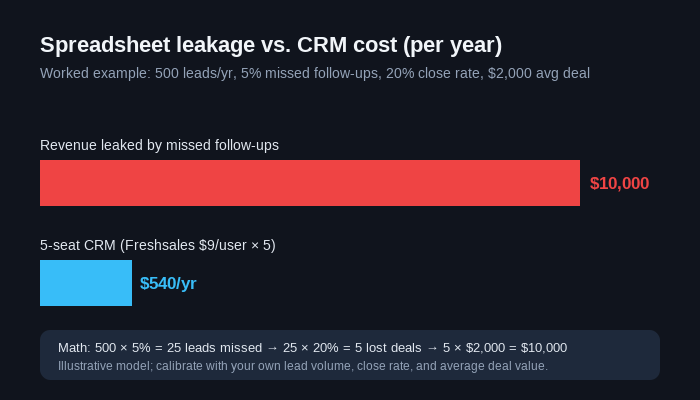
If the CRM costs $9–$14 per seat, the case isn't about software — it's about leakage. A worked example for a small service business:
- 500 inbound leads per year, spreadsheet follow-ups missed on 5% of them: 25 leads lost.
- At a 20% close rate on properly followed leads: 5 deals lost.
- At a $2,000 average deal: $10,000 in revenue leaked per year — versus roughly $450–$840 per year for a 5-seat CRM.
Broader data backs the pattern: 78% of customers buy from the company that responds first, and spreadsheets have no mechanism to guarantee a first response — reminders live in individual memory.
That's also why we tell clients that lead response time is the cheapest lever in their funnel, alongside the automation basics in our guide to AI automation for small business.
AI Features Worth Paying For (and the Ones to Skip)
Every vendor now leads with AI. At under 10 seats, the useful/overpriced split looks like this:
Worth paying for:
- Email drafting and reply suggestions — usually included in entry tiers or free add-ons. Saves the most time per dollar of any AI feature; follow-up writing is exactly where small teams stall.
- Call transcription and summaries — Freshsales bundles phone tools; Pipedrive and HubSpot offer call recording with AI notes. For service businesses where deals close on calls, this removes an hour of weekly note-taking per rep.
- Next-step and deal-health nudges — Pipedrive's AI sales assistant and Zia's best-time-to-contact suggestions act like a follow-up reminder system that actually knows your pipeline.
Skip until you're much bigger:
- Predictive lead scoring at premium tiers — HubSpot's Breeze Intelligence and advanced AI lead scoring sit behind Professional ($90/seat + $1,500 onboarding); Zoho's deepest Zia features, including autonomous Zia agents and churn prediction, are gated to Enterprise. With a few hundred contacts, a simple "email opened in last 14 days" filter does most of the same job for $0.
- AI chatbot agents — priced per bot session and useful only once you have enough website traffic to feed them. Fix human follow-up first.
The honest version: at small scale, AI in a CRM is a time-saver, not a revenue strategy. The revenue strategy is that every lead gets a response within the hour, and every deal has a scheduled next action — which was true before AI and costs $7 per seat to enforce.
How to Choose in One Trial Weekend
Sign up for two free trials on Friday — Bigin, Freshsales, Pipedrive, and HubSpot all offer 14–15 day trials with no credit card — and import 20 real contacts into each. Then pick using this sequence: (1) does your team log activity in it without being nagged, (2) can you build your actual pipeline stages in under an hour, (3) what does it cost at the seat count you'll have in 12 months, on monthly billing if annual pricing is risky. Adoption beats features every time: the best CRM is the one your team actually updates.
If you'd rather have a partner handle it — CRM selection, spreadsheet cleanup, migration, and automated follow-up sequences built on top — contact SparkSphear for a fit call. We set up small-business CRMs as part of our AI automation services, and the fit call is free.
Frequently Asked Questions
What is the best CRM for a small business in 2026?
For most: Bigin by Zoho from $7/user/month on a budget, Freshsales at $9/user/month if you live on calls and email, Pipedrive at $14/seat/month for pipeline-focused sales teams, and HubSpot if you want to start free and add marketing later. All four are consistently top-ranked in PCMag's and TechRadar's 2026 small-business CRM comparisons.
How much should a small business pay for a CRM?
For teams under 10 seats: $10–$25 per seat per month is the normal band, so roughly $50–$250/month total. Avoid per-seat pricing above $50/seat (HubSpot Professional territory, $90/seat plus a $1,500 onboarding fee) until you can name the specific feature you're paying for.
Can I migrate my contacts from Excel to a CRM without losing data?
Yes — clean the sheet first (dedupe, fix formats), map columns to CRM fields, run a 10–20 record test import, and check it by hand before the full import. Vendors' import wizards handle CSV well; data loss almost always traces to skipped field mapping, not the tool. The whole move takes an afternoon for a few hundred contacts.
Are AI features in small-business CRMs worth paying for?
The cheap ones, yes: AI email drafting, call transcription, and next-step suggestions save real time and are often included or addable at entry tiers. Skip premium predictive lead scoring and AI agent add-ons until you have thousands of active contacts — at small scale, simple engagement filters do most of the same job for free.
Is HubSpot's free CRM actually usable, or just a trial?
Usable, with limits: 2 users, 1,000 contacts, unlimited-time access, deal pipelines, meeting scheduling, and live chat. A third user who edits records requires a paid seat ($15–$20/seat on Starter). It's the lowest-risk way to test whether your team will adopt a CRM at all before paying anything.
Want these results for your Business Systems?
We build custom AI agents and workflow automations tailored to your exact operations. Stop losing money to manual work.