
What Is X12 EDI 270/271? A Plain-English Guide to Eligibility Checks
Affiliate Disclosure: This page contains affiliate links. If you purchase through our links, we may earn a commission at no extra cost to you. This helps us keep creating free content. Learn more
What Is X12 EDI 270/271? A Plain-English Guide to Eligibility Checks
If you work in medical billing, front-desk administration, or run a small practice, you already check insurance eligibility every single day. Most of that checking happens invisibly inside your practice management system or a payer portal. But at some point a colleague, an auditor, or an integration error puts an actual 270 or 271 file in front of you — and it looks like a ransom note typed in asterisks.
The short answer: A 270 is an electronic question — "Is this patient still covered, and what are their benefits?" A 271 is the insurer's structured answer. Both are X12 EDI files, the same family of plain-text formats that carry claims and payments (we walked through the two most common ones — the 837 claim and 835 remittance — in our X12 EDI 837/835 beginner's guide). The 270/271 pair is the front end of that whole conversation: it runs before the patient is seen, before the claim exists, and before there's any money to fight over.
Getting eligibility right at the front end is the cheapest revenue-cycle work you can do. Getting it wrong is one of the most common ways claims end up denied.
In this guide we'll show you what a 270 and a 271 actually look like, walk through real sample segments line by line, cover the pain points that trip up beginners, tell you where your files live, and explain when manual checking stops making sense.
Key Takeaways
- A 270 is the eligibility inquiry a provider sends to a payer; a 271 is the payer's response containing coverage status, benefit details, and sometimes free-text explanations.
- Both are plain-text X12 files using
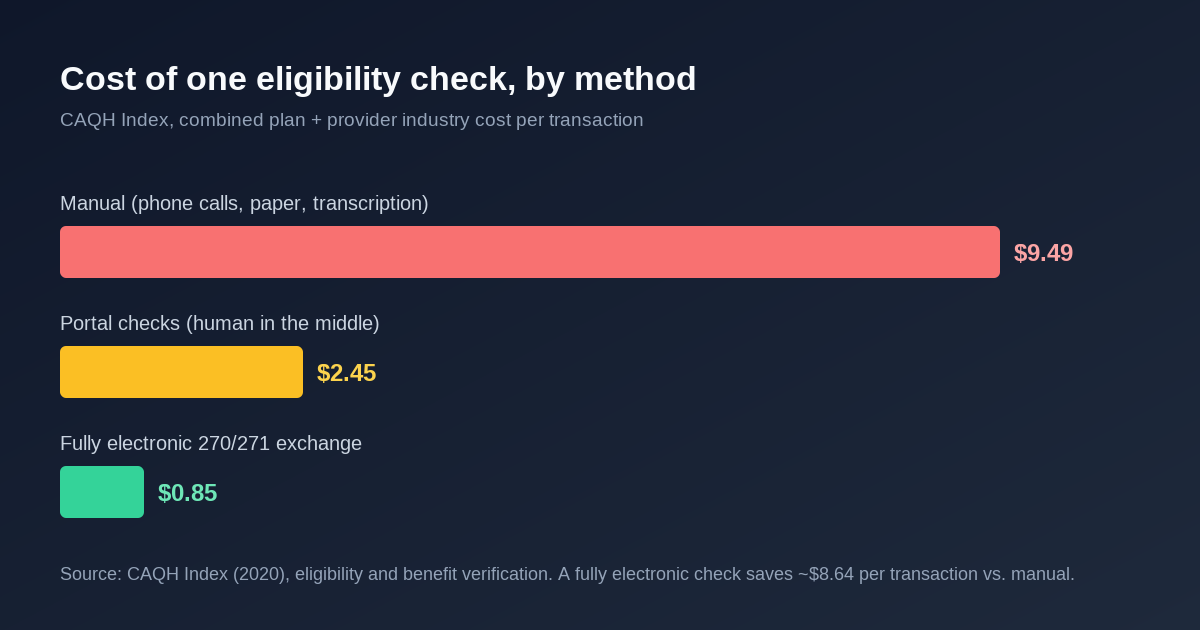
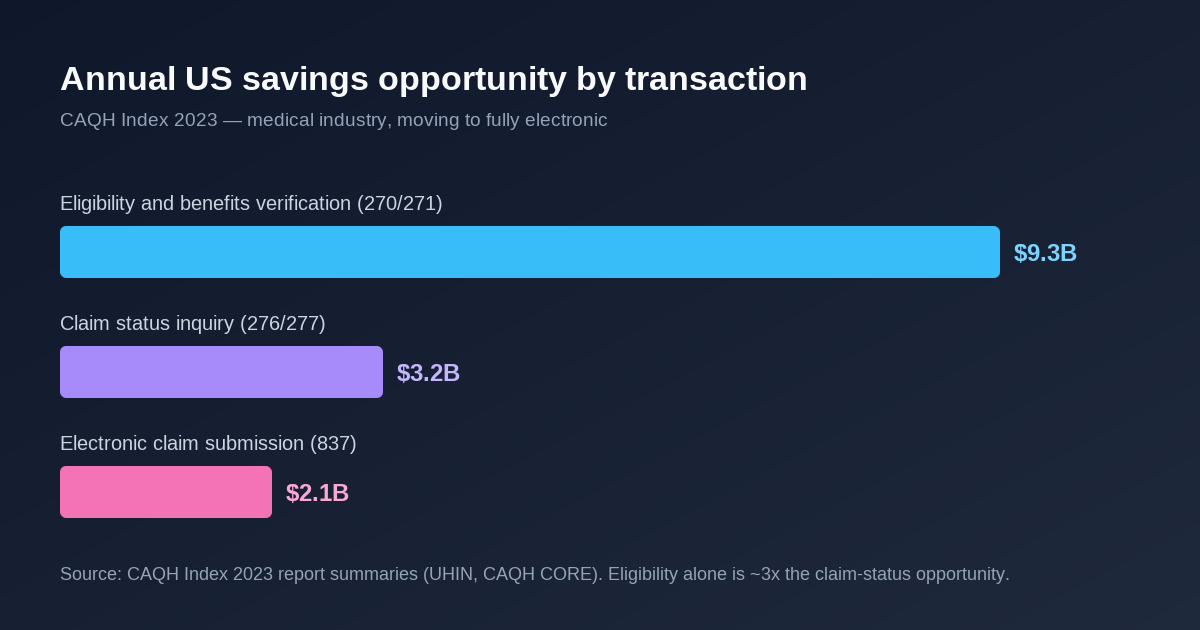
*between fields and~between segments — you can open them in Notepad and read them yourself.- The CAQH Index pegs a manual eligibility check at roughly $9.49 in combined plan and provider cost per transaction, versus $0.85 when it runs fully electronically — and puts $9.3 billion in annual industry savings on the table for eligibility alone (CAQH Index, retrieved 2026).
- In Experian Health's 2025 State of Claims survey, 41% of providers reported denial rates above 10%, and denials tied to missing or inaccurate data remain the single biggest bucket (Experian Health, retrieved 2026). Inaccurate eligibility is a classic member of that bucket.
- When your team is re-checking coverage by hand for more than a handful of visits a day, or clean claims are bouncing for coverage reasons, automated 270/271 integration pays for itself quickly.
What Is an X12 270 and a 271, Exactly?
First, the family context. X12 is the ANSI-developed EDI dialect that HIPAA mandates for healthcare transactions in the United States. Every electronic claim, payment, and eligibility check your practice participates in is an X12 "transaction set" with a numeric code.
The 270/271 pair is the eligibility conversation:
| Code | Name | Who Sends It | Plain-English Meaning | |------|------|-------------|----------------------| | 270 | Eligibility, Coverage or Benefit Inquiry | Provider → Payer | "Is John Doe covered under policy W123456789? What are his benefits?" | | 271 | Eligibility, Coverage or Benefit Response | Payer → Provider | "Yes — active HMO plan, $1,000 annual deductible with $175 remaining, office visits covered at 80% after deductible" | | 837 | Healthcare Claim | Provider → Payer | "Here's what I did for this patient, please pay me" | | 835 | Health Care Claim Payment / Advice | Payer → Provider | "Here's how we processed your claim" |
The current implementation guide version is 005010X279A1 — you'll see that string in the file headers. If you spot 005010X279 (without the A1), you're looking at an older 5010-era file; the structure is nearly identical.
One thing surprises beginners: the 271 often does not say "covered: yes" in so many words. Instead, it returns EB segments (Eligibility Benefit) that each describe one slice of the benefit picture — active coverage status, deductible amounts, coinsurance percentages, visit limits — and the provider's system (or the human reading it) assembles those slices into an answer. We'll decode those below.
What Does a 270 Inquiry Actually Look Like?
Open a 270 in any text editor (Notepad is fine) and you'll see something like this — a real-shaped example, simplified to one segment per line:
ISA*00*          *00*          *ZZ*SMILEDENTAL  *ZZ*BCBSNASH     *251115*0900*^*00501*000000123*0*T*:~
GS*BE*SMILEDENTAL*BCBSNASH*20251115*0900*123*X*005010X279A1~
ST*270*0001*005010X279A1~
BHT*0077*13*20251115*0900*270REQ001~
HL*1**20*1~
NM1*IL*1*DOE*JOHN****MI*W123456789~
DMG*D8*19800412*M~
NM1*PR*2*BLUE CROSS BLUE SHIELD*****PI*BCBS001~
TRN*1*270REQ001*9800000004*AB~
SE*8*0001~
GE*1*123~
IEA*1*000000123~
Twelve lines. That's an entire eligibility question. Let's break it down the same way we did in the 837/835 guide.
The Envelope: ISA, GS, ST, and the Trailers
ISA— the interchange header, always the first line. It names the sender (ZZ*SMILEDENTAL, your practice's EDI ID) and receiver (ZZ*BCBSNASH, the payer's ID), plus a date/time stamp and a control number. If the control number here doesn't match theIEAtrailer at the bottom, the file was truncated or corrupted in transit.GS*BE— the functional group header.BEis the function code for eligibility inquiries. (A 271 usesGS*HBinstead — eligibility response.) The version string005010X279A1lives here too.ST*270— "transaction set 270 begins now." The second element is the control number for this transaction; theSEtrailer must repeat it.BHT*0077*13— the beginning-of-transaction segment. The13is the transaction-purpose code meaning "inquiry or request." It also carries a reference number (270REQ001) your system can use to match the 271 that comes back.SE,GE,IEA— the closing trailers, each mirroring its opening segment with a segment/group/interchange count.
The Request Loop: HL, NM1, DMG
The actual question lives in a small hierarchy:
HL*1**20*1~                          ← Level 20 = SUBSCRIBER (the person holding the policy)
NM1*IL*1*DOE*JOHN****MI*W123456789~  ← IL = Insured or Subscriber; name + member ID
DMG*D8*19800412*M~                   ← DOB (1980-04-12) and gender
NM1*PR*2*BLUE CROSS BLUE SHIELD*****PI*BCBS001~  ← PR = Payer; PI = payer identifier
TRN*1*270REQ001*9800000004*AB~       ← Trace number to match the 271 against
Three identifiers do the real work: the subscriber's name (NM1), their member ID (MI*W123456789), and their date of birth (DMG). If any of the three is wrong, the payer returns a 271 that says — in its own coded way — "I can't find this person." That's the number-one beginner error we'll come back to.
If you're asking about a dependent (a child on a parent's plan), the file adds a second HL level — a level 22 loop nested under the subscriber, carrying the dependent's name and DOB.
That's it. A 270 is short, structured, and boring — which is exactly what you want in a machine-to-machine question.
How to Read a 271 Response (Step-by-Step)
Here's the 271 that comes back for our inquiry, again one segment per line:
ISA*00*          *00*          *ZZ*BCBSNASH     *ZZ*SMILEDENTAL  *251115*0901*^*00501*000000456*0*T*:~
GS*HB*BCBSNASH*SMILEDENTAL*20251115*0901*456*X*005010X279A1~
ST*271*0001*005010X279A1~
BHT*0077*111*20251115*0901*270REQ001~
HL*1**20*1~
NM1*IL*1*DOE*JOHN****MI*W123456789~
NM1*PR*2*BLUE CROSS BLUE SHIELD*****PI*BCBS001~
EB*1**IND*23~
EB*D**IND~                          ← Deductible benefit exists
MSG*DEDUCTIBLE REMAINING $175.00~
SE*10*0001~
GE*1*456~
IEA*1*000000456~
Note ST*271 and GS*HB on the response side, and the BHT purpose code is now 111 ("response"). The trace number in the reference section (270REQ001) matches our 270 — that's how your system pairs a response with the request it belongs to.
Step 1: Find the EB Segments — That's the Answer
Every EB segment describes one benefit fact. The critical field is EB01, the eligibility benefit code:
| EB01 Code | Meaning | What You Should Do |
|-----------|---------|-------------------|
| 1 | Active coverage | Good — proceed |
| A | Inactive, eligibility unknown | Call the payer |
| B | Inactive | Patient's coverage has lapsed — get new insurance |
| C | Inactive / ineligible | Same as above |
| D | Deductible information | Read the amount fields |
| F | Limitation | Service may be restricted — read the notes |
| N | Special handling | Read the MSG text carefully |
In our sample, EB*1**IND*23 reads: benefit code 1 (active coverage), coverage level IND (individual), time period 23 (calendar year). Translation: John Doe has active individual coverage for 2025.
EB*D**IND says there's deductible information for this individual — and the very next MSG*DEDUCTIBLE REMAINING $175.00~ is free-text spelled out in plain English: he still owes $175 of his deductible before coinsurance kicks in.
A real 271 from a major payer typically carries many more EB segments — one each for the annual deductible, coinsurance percentage per service type, visit limits (say, EB*B**IND**35*12 — visit-limit benefit, 12 per period), and sometimes separate blocks for family-level vs. individual-level amounts.
Step 2: Check the Time-Qualifier Codes
The fourth element in an EB segment (23 in our example) tells you the benefit period:
23= Calendar year24= Calendar year to date29= Month to date33= Lifetime35= Per visit
When someone asks "is that deductible $1,000 per year or per lifetime?", this code is the answer. Mixing up period codes is how practices confidently tell a patient the wrong thing.
Step 3: Don't Panic at AAA Segments — But Do Read Them
When the payer can't answer — or answers "no" — you get AAA segments instead of EB segments:
AAA*N**73~
AAA is an administrative error segment. The N means rejection, and 73 is the code for "subscriber not found." Other common ones include invalid member ID, patient not eligible for the requested date, or missing required fields. A 271 that's all AAA and no EB is a polite "no data" — never treat silence or a reject as "probably covered."
Step 4: Match the Trace Number Before You Trust It
Before posting anything, confirm the 271's reference/trace number matches the 270 you sent, and that the member ID in the response matches the patient you asked about. Large practices send hundreds of inquiries daily; mismatched responses are a quiet source of "but the system SAID he was covered" disputes.
A Note on Composites: What EB*A**IND**35 Doesn't Tell You
The 271 answers whether and how much — active status, deductibles, coinsurance, visit counts. It does not guarantee payment for a specific procedure. Prior authorization, medical necessity, and claim-level edits still apply. Eligibility verification is a gate, not a green light.
Common Pain Points That Trip Up Beginners
These are the problems that show up over and over on r/edi, the EasyMorph community, and billing-team help desks:
1. "My eligibility check says the patient isn't found"
Overwhelmingly, this is a data-entry mismatch, not a payer outage. The three fields the payer matches on are last name, member ID, and DOB. A transposed digit in the member ID or a hyphen the payer doesn't expect (W123-456789 vs W123456789) returns "subscriber not found."
What to do: Re-run the inquiry using exactly the member ID and DOB printed on the insurance card. If it still fails, the 271's AAA code tells you which field the payer objects to. Escalate to the payer line only after that.
2. Reading "Active" and Assuming "Covered for This Procedure"
EB segments say the plan is active. They don't say the specific service is a covered benefit, in-network, or not subject to a waiting period. Practices that treat a bare EB*1 as full approval end up performing services the plan never covers.
What to do: For high-dollar services, require the benefit-specific EB segments (deductible, coinsurance, limitation) for the relevant service type — not just the active-coverage flag — plus a portal check on authorization requirements. The 271 often includes MSG free text saying exactly that, but only if someone reads it.
3. Portal Checks vs. 270/271 — Knowing What You're Actually Getting
Half the industry verifies eligibility by logging into a payer portal and squinting at a screenshot. The CAQH Index classifies that as "partially electronic" — a human in the middle — and prices it accordingly: roughly $2.42 per check for the provider vs. $0.85 fully electronic, per its 2020 Index (CAQH Index, retrieved 2026). Beyond cost, portal screenshots aren't machine-readable, can't be stored against the patient record automatically, and can't be re-verified the night before surgery in a batch.
What to do: If your practice management system can request eligibility directly (most can — look for "real-time eligibility" or "270/271" in the settings), turn it on and stop screenshotting portals.
4. Nobody Re-checks Eligibility Between Scheduling and the Appointment
Coverage checked at scheduling can be gone by the visit date — job changes, plan-year transitions, Medicaid redeterminations. That's how a perfectly scheduled, perfectly treated patient becomes a self-pay letter.
What to do: Re-verify 24–48 hours before the appointment, automatically. This is exactly the kind of batch job automation handles well, and it's the single cheapest denial-prevention habit in the revenue cycle. Experian Health's 2025 State of Claims survey found 41% of providers with denial rates above 10%, a figure that has climbed every year since 2022 (Experian Health, retrieved 2026) — front-end eligibility is where a large share of that pain starts.
Where Do You Find Your 270/271 Files?
| Source | What You Get | How It Arrives | |--------|-------------|----------------| | Clearinghouse portal (Availity, Waystar, Change Healthcare, Trizetto) | Downloadable 271 responses per inquiry | Log in → Eligibility/Transactions section → filter by patient or date → download the raw response | | Practice management system (Epic, Athena, NextGen, eClinicalWorks, Dentrix) | Parsed eligibility screen, sometimes with raw XML/EDI view | The PM system sends the 270 and parses the 271 automatically; raw files are often retrievable for audits | | Direct payer connection | Raw 270/271 files exchanged over SFTP or a payer API | IT provisions the connection; responses land in a designated folder or endpoint in real time | | Batch files | Overnight 270 request files and 271 response files | Your system or clearinghouse queues inquiries during the day and exchanges files in a nightly batch |
Most small practices never see the raw files because their software handles the exchange. But if you're integrating systems, debugging a mismatch, or answering an auditor, ask your clearinghouse or PM vendor for the raw 271 — every one of them can produce it.
Pro Tip: Archive the Raw Responses
Just like the 835 advice in our claims and remittances guide: when a payer later insists a service wasn't covered, the raw 271 you received on the date of service is your evidence. Store it with the patient record, not in a shared Downloads folder.
When Should You Bring in Automation?
Checking eligibility manually is fine at low volume. It stops being fine fast. Here's the threshold we use:
- More than ~25–30 visits a day across the practice — manual portal checks at that volume consume over an hour of front-desk time daily
- Denial rates above 5–10% where eligibility or registration data is a recurring denial reason
- Multi-payer panels where each portal has a different layout, login, and benefit vocabulary
- Schedule churn — high no-show-and-refill rates mean coverage changes between booking and visit
- Anyone transcribing portal screenshots into your system — that human step is where both cost and errors live
Automated eligibility runs a 270 against every scheduled patient 24–48 hours ahead, parses the 271 into structured fields (active/inactive, deductible remaining, coinsurance, visit limits), flags every inactive or ambiguous response for human review, and archives the raw file. At CAQH's cost figures, moving from manual to fully electronic checking saves roughly $8.64 per transaction in combined cost — and the CAQH Index puts the annual industry savings opportunity for eligibility alone at $9.3 billion (CAQH Index 2023, retrieved 2026). A practice running 10,000 eligibility checks a year keeps the equivalent of two to three weeks of front-desk payroll — before counting a single prevented denial.
At SparkSphear, we build exactly this kind of automation — AI agents and EDI integrations that run batch eligibility checks, parse 271 responses into your workflow, and flag problems before the patient walks in. If your front desk is living in payer portals, let's talk. For the wider picture of what we automate beyond eligibility, see AI automation for small business.
Frequently Asked Questions
Is a 270/271 the same thing as "real-time eligibility"?
Yes — "real-time eligibility" or "RTE" is the industry marketing term for a 270/271 exchange that completes in seconds while the patient is on the phone or at the desk. Batch eligibility uses the same two transaction sets, just queued and exchanged overnight.
What's the difference between the 270/271 and the 276/277?
The 270/271 asks about coverage and benefits — is this person insured, and what does the plan pay? The 276/277 pair asks about claim status — what happened to the claim I already submitted? In the revenue cycle, 270/271 runs before service; 276/277 runs after submission.
Why did I get a 271 that says "active" but my claim was denied for coverage?
The 271 reported the plan was active on the inquiry date. The denial usually comes from something the active-flag doesn't address: a service that isn't a covered benefit, a lapsed policy discovered at claim time, coordination-of-benefits conflicts, or authorization requirements. Read the denial reason code against the benefit-specific EB segments and MSG text from the 271 — they often explain the gap.
What does 005010X279A1 mean?
It's the implementation guide version for the current 270/271 standard: version 5010, guide X279A1. All HIPAA-regulated eligibility transactions use it. When you see that string in the ISA/GS/ST headers, you're looking at a current-spec file.
Can I send a 270 directly to a payer without a clearinghouse?
Technically yes, but practically the same trade-off as direct claim submission: each payer requires its own connection, testing, and certification. Clearinghouses exist to maintain those connections for hundreds of payers at once. Most practices route 270/271 through their clearinghouse even when claims flow the same way.
How far in advance can I check eligibility?
You can ask about any date. The DTP*291 (eligible date) field in the inquiry tells the payer which date's coverage to answer for — so you can verify next month's surgery today. Just remember coverage can change between the check and the date of service, which is why re-checking 24–48 hours before the appointment is standard practice.
Bottom Line
The 270 is a twelve-line question; the 271 is a structured answer made of EB segments. Once you know where to look — EB01 for active/inactive, the period codes for "per year or per lifetime," AAA segments for rejections, MSG text for the fine print — these files stop being alien code and start being exactly the receipt you need before you treat a patient.
The whole point of the front end of the revenue cycle is to prevent problems while they're still free to fix. Eligibility checked correctly before the visit is the cheapest denial you never have to appeal.
And if checking coverage for every scheduled patient by hand sounds like a job you never signed up for? That's exactly why SparkSphear exists — book a free fit call and we'll show you what automated 270/271 verification looks like wired into your own practice management system. For the other half of the billing conversation, read our X12 EDI 837/835 beginner's guide, and for the broader automation playbook, see AI automation for small business.
Want these results for your Business Systems?
We build custom AI agents and workflow automations tailored to your exact operations. Stop losing money to manual work.