
What Is X12 EDI? A Plain-English Guide to 837 Claims & 835 Remittances
Affiliate Disclosure: This page contains affiliate links. If you purchase through our links, we may earn a commission at no extra cost to you. This helps us keep creating free content. Learn more
What Is X12 EDI — And Why Does Your Insurance Company Send You Files That Look Like Ancient Alien Code?
If you work in healthcare administration, medical billing, or run a small practice, you've probably opened a file from your insurance payer and thought one of two things: "This looks like a spreadsheet from the 1990s" or "How do I even open this?"
You're not imagining things. Those files are real, they carry real money, and understanding them can save your practice thousands of dollars a month.
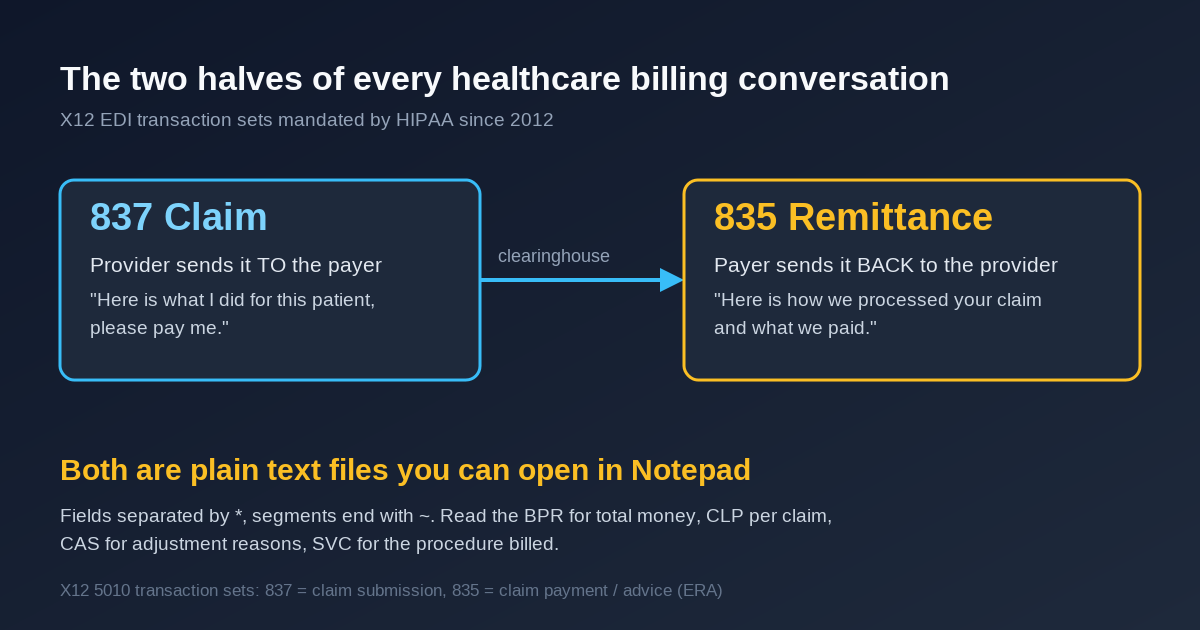
The short answer: Healthcare insurance companies send each other data in a format called X12 EDI. The two files you'll see most often are the 837 (a claim sent to the insurer) and the 835 (the insurer's response explaining what they paid). They look like gibberish because they use special characters instead of commas or tabs. But once you know the structure, reading them is straightforward.
In this guide, we'll walk through exactly what these files are, show you how to read one step-by-step with real examples, cover the pain points that trip up beginners, tell you where to find your own files, and explain when it makes sense to bring in automation tools instead of doing everything manually.
Key Takeaways
- An 837 is the HIPAA-mandated electronic claim every US provider sends insurers to get paid for services rendered. An 835 ERA is the insurer's payment explanation returned in reply.
- Both files are plain text using
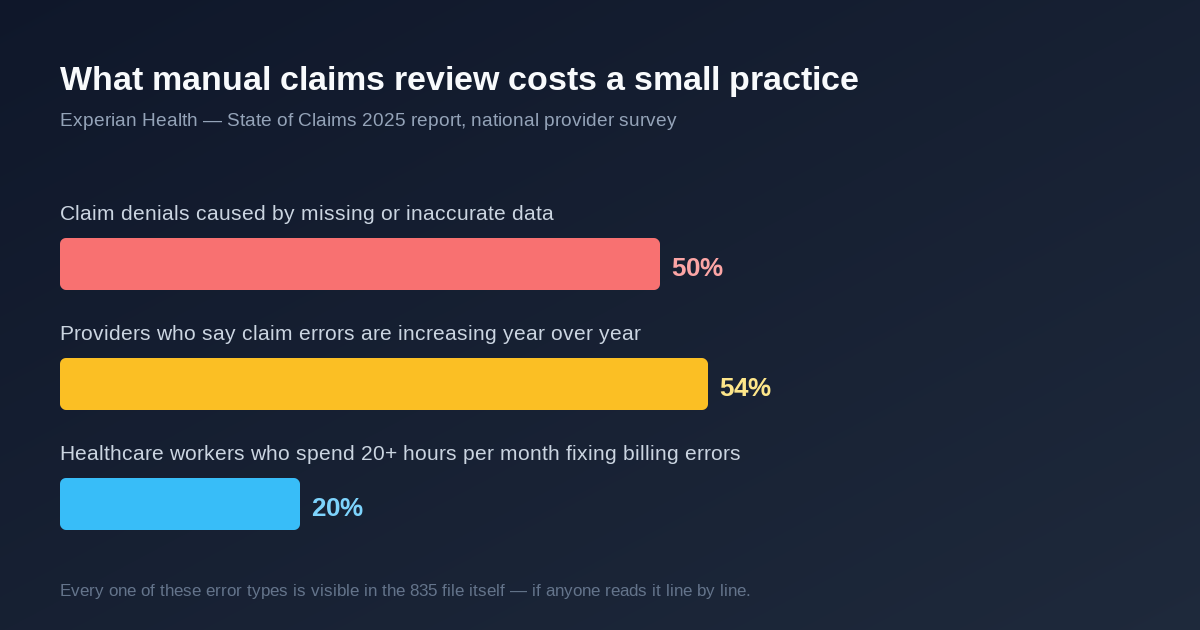
*between fields,~between segments, and hierarchical loops — no software needed to start reading them.- According to Experian Health's State of Claims 2025 report, 50% of all claim denials come from missing or inaccurate data, and nearly 20% of healthcare workers spend over 20 hours per month correcting billing errors (Experian Health, retrieved 2025).
- Most small practices lose revenue from three sources: misread remittances (especially PLB recoupment segments), late filing deadlines, and fee schedule mismatches nobody checks.
- When manual file review starts consuming more than a few hours weekly, or you're seeing consistent underpayments, it's time to evaluate an automated EDI integration solution.
What Is X12 EDI, Anyway?
Let's start at the very beginning.
EDI stands for Electronic Data Interchange. It's simply a standardized way for computers to exchange business documents — purchase orders, invoices, claims — without any humans typing anything into a form. Think of it as a language machines speak to each other.
X12 is one specific dialect of EDI. Developed by ANSI (American National Standards Institute), X12 is the version mandated by HIPAA for healthcare transactions in the United States. Since the 5010 update took effect in 2012, virtually all electronic healthcare claims and payments flow through X12 formats.
There are dozens of X12 transaction types. The ones that matter most for providers are:
| Code | Name | Who Sends It | Plain-English Meaning | |------|------|-------------|---------------------| | 837 | Healthcare Claim | Provider → Payer | "Here's what I did for this patient, please pay me" | | 835 | Health Care Claim Payment / Advice | Payer → Provider | "Here's how we processed your claim" | | 270/271 | Eligibility Inquiry / Response | Provider → Payer (and back) | "Is this person covered?" / "Yes, here are their benefits" | | 276/277 | Claim Status Request / Response | Provider → Payer and back | "Has my claim been decided yet?" | | 834 | Benefit Enrollment | Employer/Agent → Payer | "These people just enrolled in coverage" |
For our purposes today, we'll focus on the 837 and the 835, because they represent the two halves of every billing conversation: asking for money and finding out what you got.
What Does an 837 Claim Actually Look Like?
Open an 837 file in any text editor (Notepad works fine) and you'll see something like this:
ISA*00* *00* *ZZ*PRACTICEID *ZZ*PAYERID *251102*1000*^*00501*000090001*1*T*:~
GS*HC*PRACTICEID*PAYERID*20251102*1000*90001*X*005010X222~
ST*837*000090001~
BHT*0019*00*123456*20251112*1000*CH~
NM1*41*2*SMILE DENTAL PLLC*****XX*9876543210~
N3*123 MAIN STREET~
N4*NASHVILLE*TN*37201~
PER*IC*JANE SMITH*TE*6155551234~
...
SE*52*000090001~
GE*1*90001~
IEA*1*000090001~
That looks intimidating. Let's break it down section by section so each part makes sense.
The Envelope: ISA and IEA Segments
Every X12 file starts with an envelope — think of it like the outside of a padded mailer. It tells receiving systems who sent the file and who should receive it.
ISA(Interchange Control Header): The first line. Contains sender ID (ZZ*PRACTICEID), receiver ID (ZZ*PAYERID), date/time, and version info. The characters betweenISAand the second field tell the system how to parse everything that follows.IEA(Interchange Control Trailer): The very last line. Confirms the total number of transactions inside and matches a control number from the ISA header. If these don't match, the file was cut off or corrupted.
Between them sits the GS/GE pair — the functional group — which groups related transactions together. An 837 can contain multiple claims in one file; they'd all live under one GS/GE block.
The Transaction Header: ST and BHT
After the envelope comes the actual claim:
ST*837: "Transaction Set" identifier. This tells the system we're about to see healthcare claim data.BHT(Beginning of Hierarchical Transaction): Contains the claim submission type (new claim, corrected claim, etc.), a unique control number for this specific transaction set, and the date.
Who Is Involved? Name Segments
The file identifies every person and organization involved using NM1 segments:
| NM1 Code | Who It Identifies | Example |
|----------|-------------------|---------|
| 41 | Billing Provider | Your practice name + NPI |
| 40 | Payer / Insurance Company | Blue Cross, Aetna, Medicare, etc. |
| IL | Subscriber (patient on the plan) | John Doe, your patient |
| QC | Patient (if different from subscriber) | Jane Doe, dependent |
| PE | Payee (who gets paid — often the provider) | Same as billing provider usually |
Each NM1 segment packs up to 12 elements — entity code, type, last name, first name, ID qualifier, ID number, etc.
The Claim Loops: 2000A, 2300, 2400
This is where the meat lives. For each patient encounter, you get a loop structure:
HL*1*0*2000A*1~ ← Loop level: patient claim
NM1*IL*1*DOE*JOHN*****MI*123456789~ ← Subscriber name & member ID
DMG*D8*19850315*M~ ← DOB and gender
CLM*$250.00*12345***Y~ ← Claim amount, reference number, yes/no accident
REF*FU*INSURANCE-ID~ ← Policy/group number
DTP*433*DF*20251015~ ← Date service occurred
SVC*99213*CPT*1~ ← Procedure code, modifier, units
HI*BK:780.7~ ← Diagnosis codes linked to services
SE*XX*0000~ ← Segment count and closing
Inside each patient loop (2000), individual service lines live under 2300. Each line has:
SVC: CPT/HCPCS procedure code, modifiers, units billedHI: Diagnosis codes (ICD-10) linked to that serviceCLM: Total claim amount
That's it. That's an entire claim — in plain text, readable by anyone with a notepad open.
How to Read an 835 Remittance Advice (Step-by-Step)
Now let's look at what comes back from the payer. An 835 ERA (Electronic Remittance Advice) is the insurer's explanation of how they processed your claims. This is where money actually changes hands, so reading it correctly matters.
Here's a simplified example of what an 835 looks like when broken into one-segment-per-line format:
ISA*00* *00* *ZZ*PAYERID *ZZ*PROVIDERID *251103*0900*^*00501*000000500*1*T*:~
GS*HP*PAYERID*PROVIDERID*20251103*0900*500*X*005010X221A1~
ST*835*000050~
BPR*I*150.00*C*ACH*CCP*01*123456*DA*98765~
TRN*1*12345*98765432~
N1*PR*BLUE CROSS BLUE SHIELD*XY*BC12345~
N1*PE*SMILE DENTAL PLLC*XX*9876543210~
CLP*CLM12345*1*$250.00*$150.00*$25.00*MC*BCCTRL98~
CAS*CO*45*$75.00~ ← Contractual adjustment
CAS*PR*2*$25.00~ ← Patient responsibility (coinsurance)
SVC*99213*CPT*1~ ← Procedure billed
AMT*AU*$175.00~ ← Allowed amount
SE*18*000050~
GE*1*500~
IEA*1*000500~
Let me walk you through this line by line, the way a billing professional would actually read it.
Step 1: Check the Payment Total (BPR Segment)
The very first thing you do with any 835 is find the BPR segment and check BPR02 — the total payment amount for this entire file.
In our example above, that's $150.00. Before you post anything to your system, verify this number matches exactly what hit your bank account from that payer on that date. If BPR says $150 but only $140 arrived, something is wrong — stop and investigate before posting a single claim.
Step 2: Match the Trace Number (TRN Segment)
Right after the BPR comes the TRN segment with trace numbers. These are like checking account reference IDs. Your bank statement will show an EFT deposit with one of these numbers. Matching them together proves the remittance belongs to the payment you see in your account.
Step 3: Identify Payer and Provider
The two N1 segments tell you who sent this (payer) and who it's for (payee/your practice). Quick sanity check: does Blue Cross really pay Smile Dental? Yes, looks right.
Step 4: Read Each Claim Loop (CLP + CAS + SVC)
This is where most beginners get lost. Inside each CLP (Claim Payment) loop, you'll find adjustments and service lines. Let's look at ours:
| What | Value | What It Means |
|------|-------|---------------|
| CLP02 | 1 | Claim status code: 1 = paid, processed |
| CLP03 | $250.00 | Amount you originally billed |
| CLP04 | $150.00 | What the payer actually paid |
| CLP05 | $25.00 | Total patient responsibility |
But why did they only pay $150 instead of your full $250? Look at the CAS (Claim Adjustment) codes sitting right below the CLP:
CAS*CO*45*$75.00: Group Code CO means "Contractual Obligation" — this is the difference between what you billed ($250) and what your contract allows ($175). This is a normal write-off; you cannot bill the patient for this. The45is the specific reason code: "Charge exceeds fee schedule or contracted rate."CAS*PR*2*$25.00: Group Code PR means "Patient Responsibility." This is coinsurance the patient owes. The2indicates coinsurance percentage.
So here's the actual math: You billed $250 → Contract allows $175 → Patient's 20% coinsurance on that is $25 → Payer pays the remaining $150. Everything checks out.
Step 5: Don't Ignore the PLB Segment
If there's more than one claim in the file, you might also see a PLB (Provider Level Adjustment) segment near the end. These are adjustments applied at the provider level, not tied to any single claim: recoupments of prior overpayments, interest payments for late payment, forward balances from coordination of benefits. A missing or unposted PLB is the #1 reason an ERA doesn't balance to its bank deposit.
A Quick Balancing Check
Every service line should follow this simple formula:
Submitted Charge − Allowable Adjustments = Paid Amount
In our example:
- Billed: $250
- Minus contractual adjustment: $75
- Minus patient responsibility: $25
- Equals payer payment: $150 ✓
When this math doesn't work out, someone needs to investigate. Underpayments happen more often than most practices realize.
Common Pain Points That Trip Up Beginners
Based on real claims data and conversations with billing teams across dozens of small practices, these are the problems that show up again and again:
1. "I Can't Open This File"
The most common beginner reaction isn't confusion about content — it's literally not knowing how to open the file. EDI files don't come as .xlsx or .pdf. They're flat text files with no familiar formatting.
What to do: Right-click the file → Open With → Notepad (or any plain-text editor). If everything appears on one impossibly long line, use Find & Replace to swap ~ for a newline character so each segment sits on its own line. Now you can actually read it.
Alternatively, free online viewers like Stedi EDI Inspector or Healthcare Data Insight Viewer let you paste your EDI file and get a clean, human-readable breakdown instantly.
2. Denials Nobody Catches Because Code Language Is Too Dense
An 835 uses codes — CO-45, PR-2, OA-23 — instead of English sentences. A new biller sees "CO-45" and has no idea whether to ignore it, call the payer, or write off the amount.
What to do: Build a quick reference sheet. The group codes matter most:
- CO = Contractual Obligation (payer-side write-off; never bill patient)
- PR = Patient Responsibility (deductible, coinsurance, copay — bill the patient)
- OA = Other Adjustment (coordination of benefits, general adjustments)
- PI = Payer Initiated Reduction (penalties, non-contractual reductions)
Keep this posted where your billing team can reference it in seconds.
3. Late Filing Deadlines You Didn't Know Existed
Every payer sets their own deadline for submitting claims — typically 90 days to one year from the date of service. Miss it and the claim dies, even if everything else was perfect. On an ERA, this shows up as CAS code CO*4.
What to do: Track filing dates in your practice management system. When a claim turns 60 days old without adjudication, investigate proactively rather than discovering rejection after the window closes.
4. Underpayments That Add Up to Thousands
This is the silent revenue killer. Your contract says $134 per office visit (CPT 99214), but the payer's allowed amount on the ERA is only $126.40. No one notices because the math looks "close enough." Over hundreds of visits a month, that gap becomes real money walking out the door.
Experian Health's 2025 State of Claims report found that 54% of providers say claim errors are increasing compared to the prior year, with data quality at intake being a major driver (Experian Health, 2025).
What to do: Once a quarter, pull a full remittance from each major payer and manually check five claims against your contracted fee schedule. If you're doing this by hand every time, you need automation.
Where Do You Find Your Own EDI Files?
If you're wondering where these files actually live in your day-to-day workflow, here's how they typically reach you:
| Source | What You Get | How It Arrives | |--------|-------------|----------------| | Clearinghouse portal | Downloadable text files or web viewer access | Log into your clearinghouse (Change Healthcare, Availity, Waystar, etc.) → Reports/EDI section → Download 835s | | Email attachment | Plain .txt file attached by payer/clearinghouse | Check your designated billing email inbox; filename often includes payer name + date | | SFTP delivery | Direct file drop into a secure server folder | IT provisions an SFTP endpoint; files appear automatically daily | | Practice Management System | Parsed view inside PM software (Epic, Athena, NextGen, eClinicalWorks) | The system auto-parses incoming 835s and displays them as readable payment screens — though you can always request the raw file for audit purposes | | Bank EFT detail | Partial info embedded in electronic fund transfer descriptions | Sometimes contains a trace/reference number that matches the 835 TRN segment |
Most small practices receive their 835 remittances through their clearinghouse portal. Log in, navigate to the reports or transactions section, filter by date range and payer, and download. The files will arrive as plain-text .txt or .edi files.
Pro Tip: Save Raw Files for Audits
Your practice management system shows a nice clean screen when you post payments. But if something ever goes wrong — a dispute with a payer, an audit, a question about why a certain amount was posted — you'll want the original, unparsed 835 file. Always keep the raw files archived for at least seven years.
When Should You Bring in Automation?
Reading individual EDI files is fine when it happens occasionally. But most established practices receive dozens of 835 files per week across multiple payers, and nobody should be opening Notepad more than once a month. Here's when it makes sense to invest in automated EDI integration:
- You spend more than 4 hours weekly manually reviewing or posting remittance files
- Payment discrepancies exceed 2–3% of total collected revenue (a sign fee schedules aren't loaded or underpayments go unnoticed)
- Claim denial rates are above 10% and you don't have automated rejection detection before submission
- Multiple staff members handle billing and there's no single source of truth for what each payer actually pays on each procedure code
- Growth has outpaced your current process — you're adding providers but still doing manual file operations from one person's desktop
If you're weighing whether AI tooling is the right answer at all, start with our guide on AI automation for small business — the build-vs-buy logic there applies directly to claims processing. And if you're budgeting for a change, our digital marketing agency pricing breakdown shows how to read any vendor's numbers the same way you'd read a remittance: line by line.
At SparkSphear, we specialize in exactly this kind of workflow automation. If your team is spending more time reading alien text files than serving patients, let's talk. We build AI agents and EDI integrations that parse these files automatically, flag underpayments against your contracted fees, and post everything straight into your practice management system — so you get paid correctly without anyone opening Notepad.
Explore our AI agent capabilities →
Frequently Asked Questions
Is X12 EDI still used in 2026, or has it been replaced?
Yes, X12 remains the HIPAA-mandated format for all healthcare electronic transactions in the US as of 2026. While APIs and JSON-based data exchange are growing in other industries, healthcare billing still runs on X12. No replacement has been adopted federally.
Can I send my own 837 claims without using a clearinghouse?
Technically yes, but practically no. Payers require specific EDI agreements, trading partner setups, and compliance validation (999 acknowledgments) that clearinghouses handle for you. Setting up direct connections with even two major payers typically requires dedicated IT resources most small practices don't have. The clearinghouse model exists precisely because every provider doesn't need to maintain separate relationships with every insurer.
What does "X12 5010" mean?
5010 refers to the version of the X12 standards that took effect January 1, 2012. It replaced the older 4010 standard. All current healthcare EDI transactions (837, 835, 270/271, etc.) follow the 005010 specification. When you see 005010X221A1 in an ISA header, that's the implementation guide version.
How long should I keep EDI transaction files?
At minimum seven years, which aligns with the HIPAA documentation retention requirement and typical statute-of-limitations periods for billing disputes. Many practices also retain them indefinitely in searchable digital archives since audit costs far exceed storage costs.
What's the difference between an ERA and an 835?
The terms are often used interchangeably, but there's a technical distinction: 835 is the actual file format (the EDI transaction set identifier), while ERA (Electronic Remittance Advice) describes what the information represents — the payer's explanation of claim adjudication. Every 835 carries ERA information; not every ERA comes through an 835 (some payers still issue paper remittances). In practice, when someone says "send me the ERA," they almost always mean the 835 electronic file.
Bottom Line
EDI isn't magic. It's just structured text with rules. An 837 is your request for payment; an 835 is their answer. Once you know where to look — BPR for total money, CLP for individual claims, CAS for adjustments, SVC for procedures — those files stop looking like ancient alien code and start looking like what they actually are: a receipt.
Understanding these documents gives you leverage. You'll catch underpayments, avoid writing off money that belongs to patients, spot filing deadlines before they expire, and know exactly which line on the file to question when something looks wrong.
And if reading raw EDI files feels like a full-time job you never signed up for? That's exactly why companies like SparkSphear exist — we automate it so your team can focus on patients instead of parsing tilde-delimited text files at midnight.
Want these results for your Business Systems?
We build custom AI agents and workflow automations tailored to your exact operations. Stop losing money to manual work.